I’ve always, like many, suffered the issue of partials getting created that are nothing to do with me, or any project I knowingly work on. But until now it’s never been a big deal, as it’s only a couple.
Now though, it’s got out of hand.
On every project I open 13 partials appear. They include…
@Steveb I had this issue too at one point (1 to 2 years ago). The issue was all about “externals”. This was a feature that was added to Stacks at one point. I finally got rid of the externals but essentially I had to do some RW project “surgery” by going inside the project file (i.e. right-click and opening the RW project).
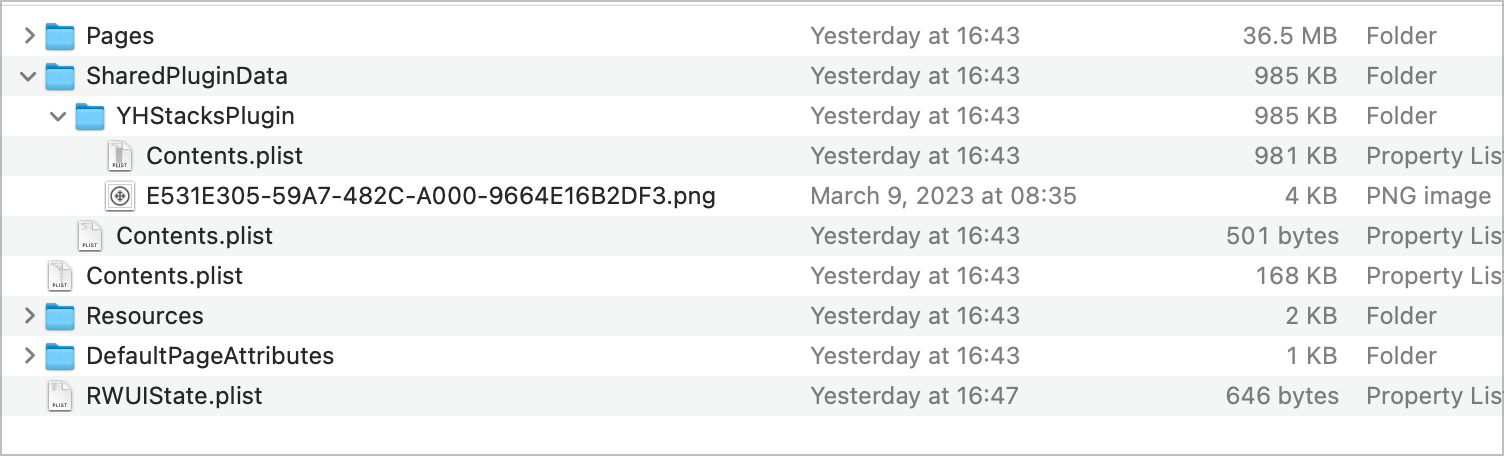
If you go inside the project you’ll see a structure like this:
… now I’m going by memory but I think within the YHStacks Plugin folder I found a big size. And I found a lot of images within that folder (they were the externals that pass on from one project to another). Even if I got rid of the images there they would come back (if memory serves corrrectly). In the end I also needed to delete one of the contents.plist files you see in the screenshot. One of them was huge (like 50 Mb or larger). But I would only do this to a backup, eliminate, and then test out for a few days before relying on it.
Externals was supposed to be this new cool feature at one point. I don’t know of anybody who actually uses this feature in an ongoing way. But like a virus it seems you got from someone who shared a project with you that also had externals.
To the best of my knowledge, here is why this happens… Because of the nature of the RW plugin system works, a plugin is allocated a specific memory space to run. This memory space is shared across all open projects. When you open a project, its partials, externals, templates and images they may contains are loaded into the project’s memory. Since the memory space that RW allocated for Stacks is shared across all projects, these items leak into other projects.
Is this RW’s fault or Stacks fault? It does not really matter. I do not expect it to be fixed by either developer. I do not expect this behavior to happen in Stacks Pro though.
I don’t know and I don’t care about whose fault it is. Like Joe, I hope this behavior will be eliminated in Stacks Pro app.
In my experience, if you have more than one project open at the same time, externals are infecting libraries of all open projects (I don’t recall having this problem with partials, though).
Removing externals from libraries of open projects is the first step. They will come back eventually if you won’t go to the next step: delete externals in Finder – which seems to be a permanent solution.
I go to HardDisk>Users>MyName>Library>Group Containers>P97H7FTHWN.com.realmacsoftware.rapidweaver>Library>Application Support>Addons>Stacks>Externals
and delete contents of that last folder – or the entire Externals folder. This usually works for me – until I open a (third-party) project that includes some unwanted externals. Then the process needs to be repeated.
Disclaimer: I am still using Mojave OS. In newer system installations, you may not find Externals folder at the same location. If that’s the case, Control-click on any external in your RW library and select the ‘Show in Finder’ option.
I gave up. This bugs me now for years. It’s not only the partials, also random images get added to the project folder. I have profile pics, dirt diggers, houses, logos …
There was a lengthy explanation (as @mitchellm pointed out, related to Externals) from Isiah on this, he tried to do some fixes but this problem never got solved.