None whatsoever, Limelight works really well on all devices.
Incidentally, PopDrop can do as well when used as the sole dropdown with a PopDrop menu stack. The problems come with multiples grouped together to make a responsive menu.
None whatsoever, Limelight works really well on all devices.
Incidentally, PopDrop can do as well when used as the sole dropdown with a PopDrop menu stack. The problems come with multiples grouped together to make a responsive menu.
From memory, there is a nice “Mega Menu” for free on Codepen, might be wrong but I think it’s formed the basis of one or two Menu stacks over the years. You will need to add it as code, and hack it around to do what you want, from I’m pretty sure the last time I saw it, it was fully featured and pretty solid.
This might be your longterm solution or a good stop-gap until Menu Lab comes along.
I think that most custom navs (and many regular nav bars) are really just placeholders for MenuLab :)
The other main issue with custom navs is that they don’t have all of the accessibility stuff that should be present within a nav bar.
That was exactly my feeling too. When you start having to add in 3rd party stacks to fill the missing gaps or to add the functionality that a framework lacks, then a full featured “framework” becomes an expensive and over complicated and bloated solution that makes no sense when compared to Source. Having used Foundry’s Mega Menu many times myself, I am now very pleased with the Source solution outlined above and I finally have the control over the nav that was missing.
I bought grid plus now and as I wanted to test how to create unevenly splitted columns/grids I am wondering if there is any documentation regarding how to use “grid - setup” > „cols template" > “enter columns template”…??? In fact I don’t even know what „1fr“ means… I found your example page - but it only shows me the result - not the options used in the stack settings…
oh man - i totally forgot about the welcome to source RW file!
now that I have the add-on stacks installed it will give me some insights. sorry for asking.
Ha! yep - that is a good starting point. Some good reference material here too: https://knowledge.shakingthehabitual.com/collection/4-source (though i do need to update it with some of the more recent additions).
Any questions just ask :)
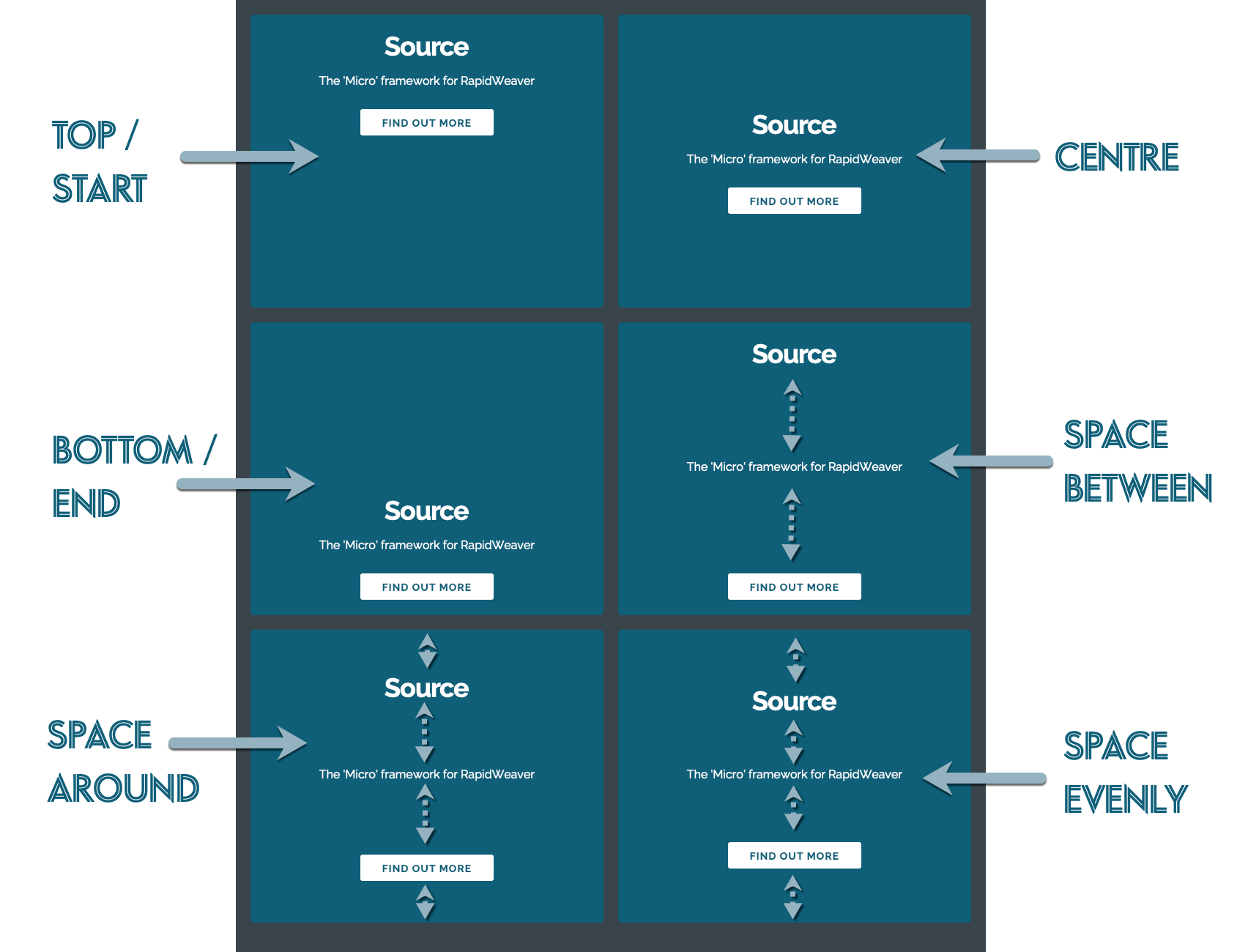
Here are the alignment options mentioned previously.
These are available as default in Grid items in both the grid stacks. They are also available in the Container stacks if you select ‘Flex container’. They also only have any effect if there is spare space in the container to do so - i.e. if a min-height has been set (or you have columns with different amounts of content in each).
These examples all use 3 stacks (Header, paragraph and button) as this is the clearest way to demonstrate the options.