Actually, all businesses that collect Google Reviews have a Place ID — even those that operate without displaying a physical address. The challenge is that Google doesn’t make it easy to find.
I know this firsthand. When I moved my side business, Google stopped showing my address and migrated me from the old Places API to Places API (New). Around the same time, I had to move a client off the Reviews Stack you mentioned. I love that stack, but I couldn’t get it to work with the new API — and review sections across my client sites have been failing one by one.
I reached out to RWPro to see if an update was coming (or if it was user error), but haven’t heard back. So I turned to ChatGPT and together we built a hand-coded reviews integration instead. You can see it in action here (scroll down):
https://www.MediaPressions.com
One client of mine has nearly 250 five-star reviews. Since Google hasn’t moved him to the new API yet, his Reviews Stack still works. But the beauty of the hand-coded setup is that I can pull in all his reviews for free (there’s only a cost if you exceed Google’s API quota). I plan to transition him on Monday.
How I got my new Place ID after moving
The easiest fix was simply adding my address back to my profile. Google required a verification video showing my mailbox, workspace, a new utility bill, etc. Once approved, they listed my business without showing the address publicly.
From there, I logged into Google Business Profile Manager, added my address, and within seconds my new Place ID appeared (it changed when they made it invisible…my old Place ID no longer worked). I could hide the address again if I wanted — but for SEO, I prefer to display it.
Another quick way to find the Place ID
- Log in to Google Business Profile Manager with the account managing the listing.
- Select the business.
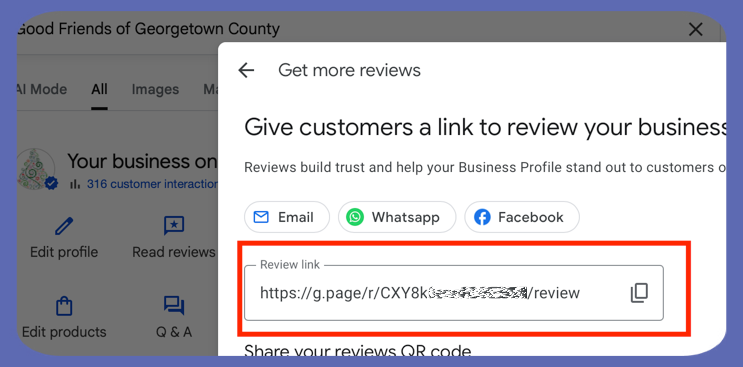
- In the menu, look for “Ask for reviews” or “Get more reviews” (location varies in the new interface).
- Click it — you’ll get a popup with a shareable link for customers.
- That link will look like:
https://search.google.com/local/writereview?placeid=ChIJ31VjYYeY9YgRlCOMu66PBBI/review
- The string after placeid= is the Place ID.
Note: If your client’s site is still using the legacy Places API, the current Reviews Stack may stop working once Google migrates them to the new API. That’s what happened with mine.
Screenshot from a client of mine who hides their street address - but still has a valid Place ID…