@tav
Hi Andrew,
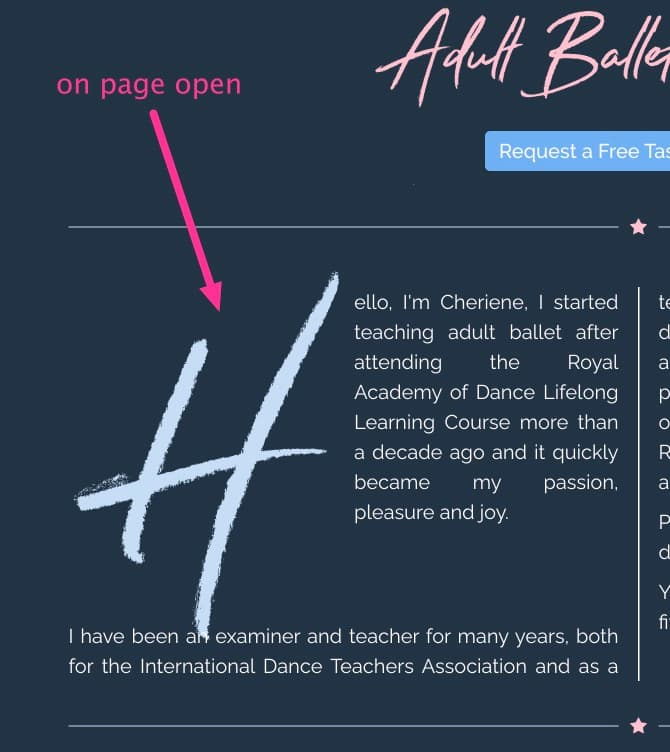
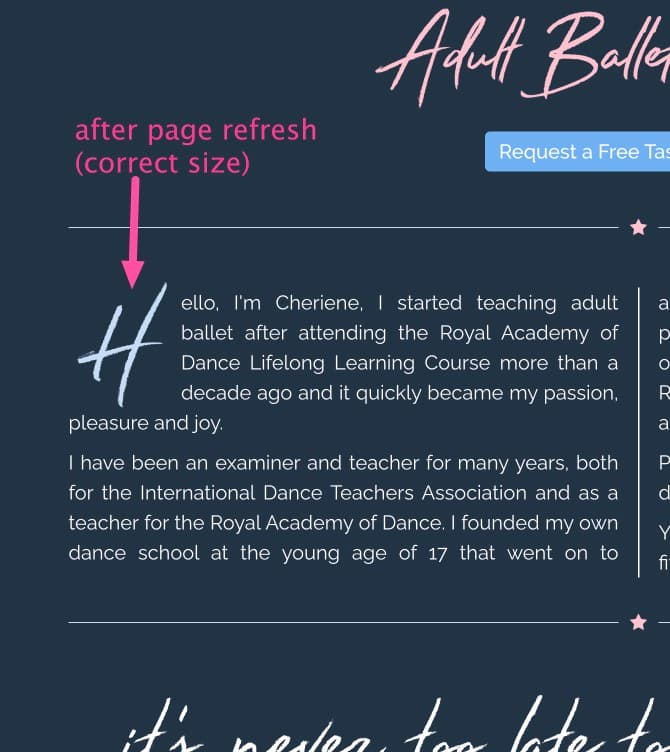
Do you have any idea when this page first opens the drop cap is too large, yet when the page is refreshed it displays as intended. I have attached two screen grabs showing the issue.
Thanks
Richard Bailey
@tav
Hi Andrew,
Do you have any idea when this page first opens the drop cap is too large, yet when the page is refreshed it displays as intended. I have attached two screen grabs showing the issue.
Thanks
Richard Bailey
Morning Richard,
That is caused by the Javascript running before the page has fully loaded (i.e. if doesn’t know the true size of the space that it needs to occupy).
What framework are you using?
I’d need to see the live page to be sure that this is the cause.
Cheers,
Andrew
@tav Hi Andrew,
I’m using Stuarts Source framework.
Here’s the URL : https://adultballetsheffield.co.uk
Richard
Does it do it with system fonts or is it related to the loading time of your Stay Rad font from your server? I wonder if the font is not loading locally as fast as the page is rendering and hence the drop cap calculation takes place before the font is in place. This could explain why it would work on a page refresh.
@tav Is there anyway I can get the font to load faster that you know of - I thought housing the font on my server would be the fastest way.
The best way to do it would be to just subset the letters you need for drop caps and then inline them are base-64 strings. This would then load with the html.
The scummy way would be to delay the JS execution or to repaint the page after font loading.
Subletting a font and inlining it is really easy with free online tools and given that you are using font pro you can then add it to RW very easily.
I’m not at my computer today but I seem to remember making some how to guides for this when I was originally developing all the font stuff.
If you get stuck I’ll help when I’m back.
@tav Hi Andrew,
Thanks for that and I would appreciate some help when you have the time as I don’t fully understand your explanation.
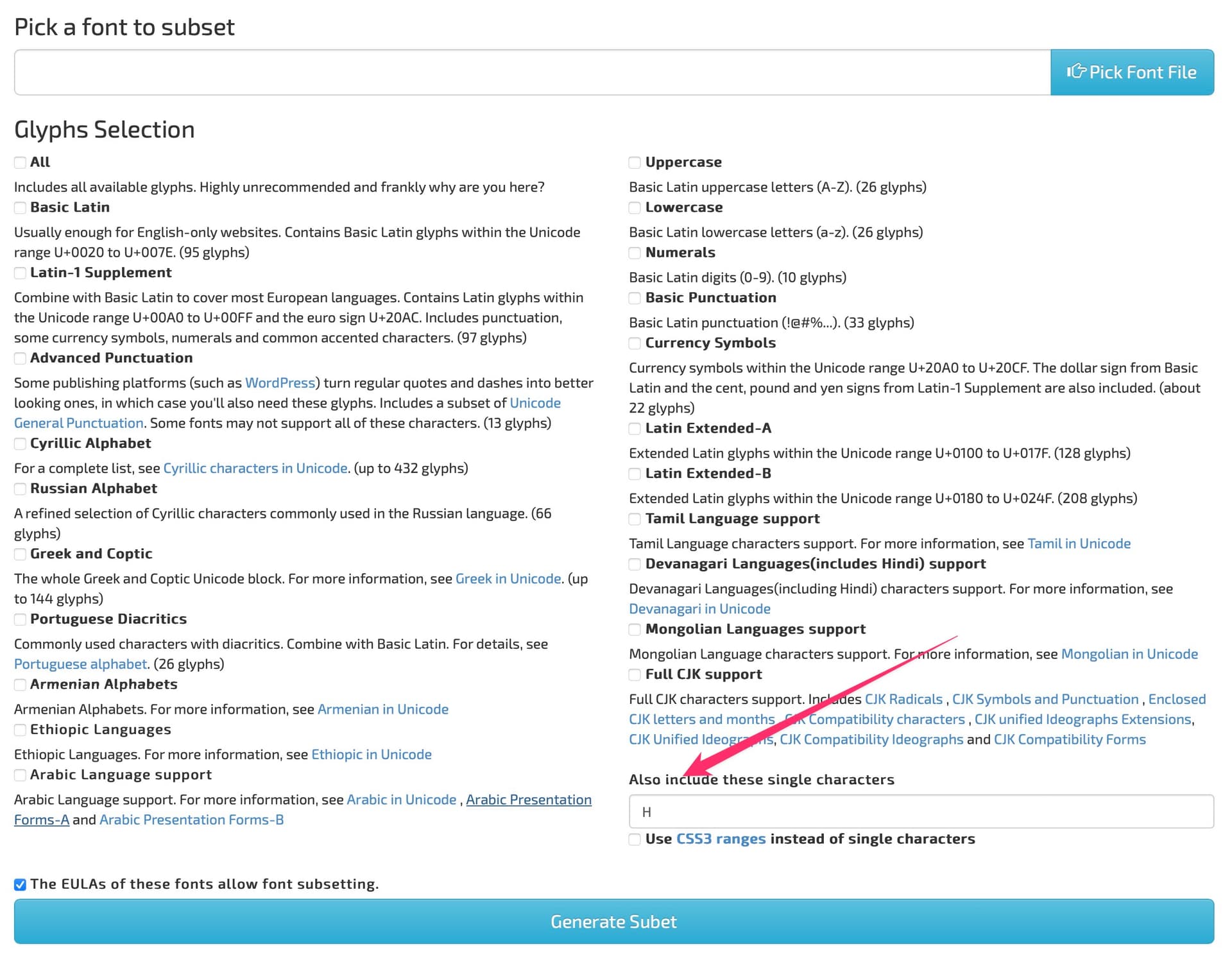
Step 1: Maske a subset of the font
(This is a good way to reduce the size and loading times of fonts that are large though in many use cases)
In this case I’ve shown it with just the letter H in an new font and everything else deselected.
Do it here (there are many others if you google it) : Font Subsetter
Step 2: Turn your new font into a base-64 encoded text file
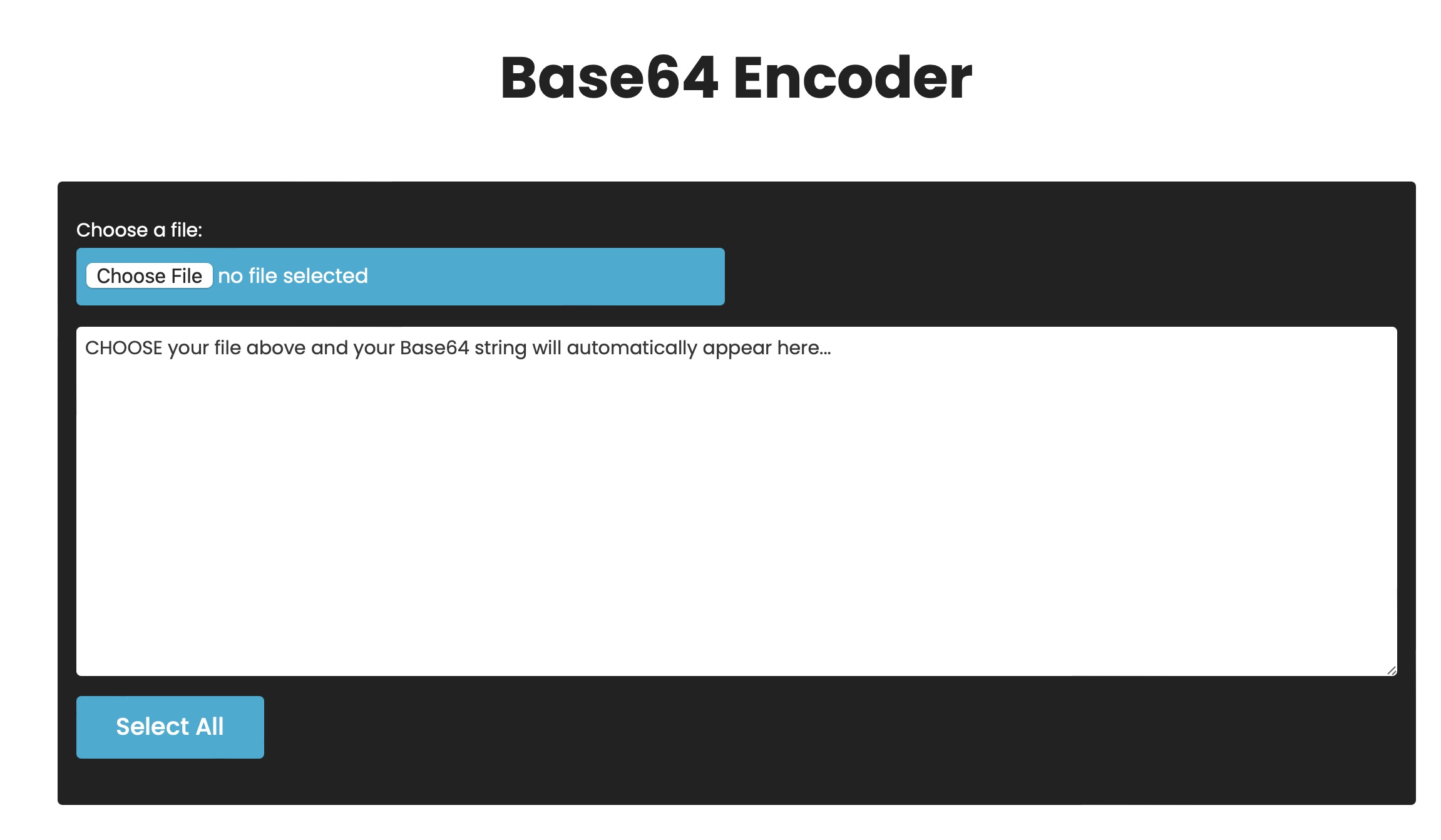
Put your newly created one letter or small font font though a base-64 encoder like this one
The base-64 text will appear in the big white box - copy this text to your clipboard
Step 3: Add the new font*
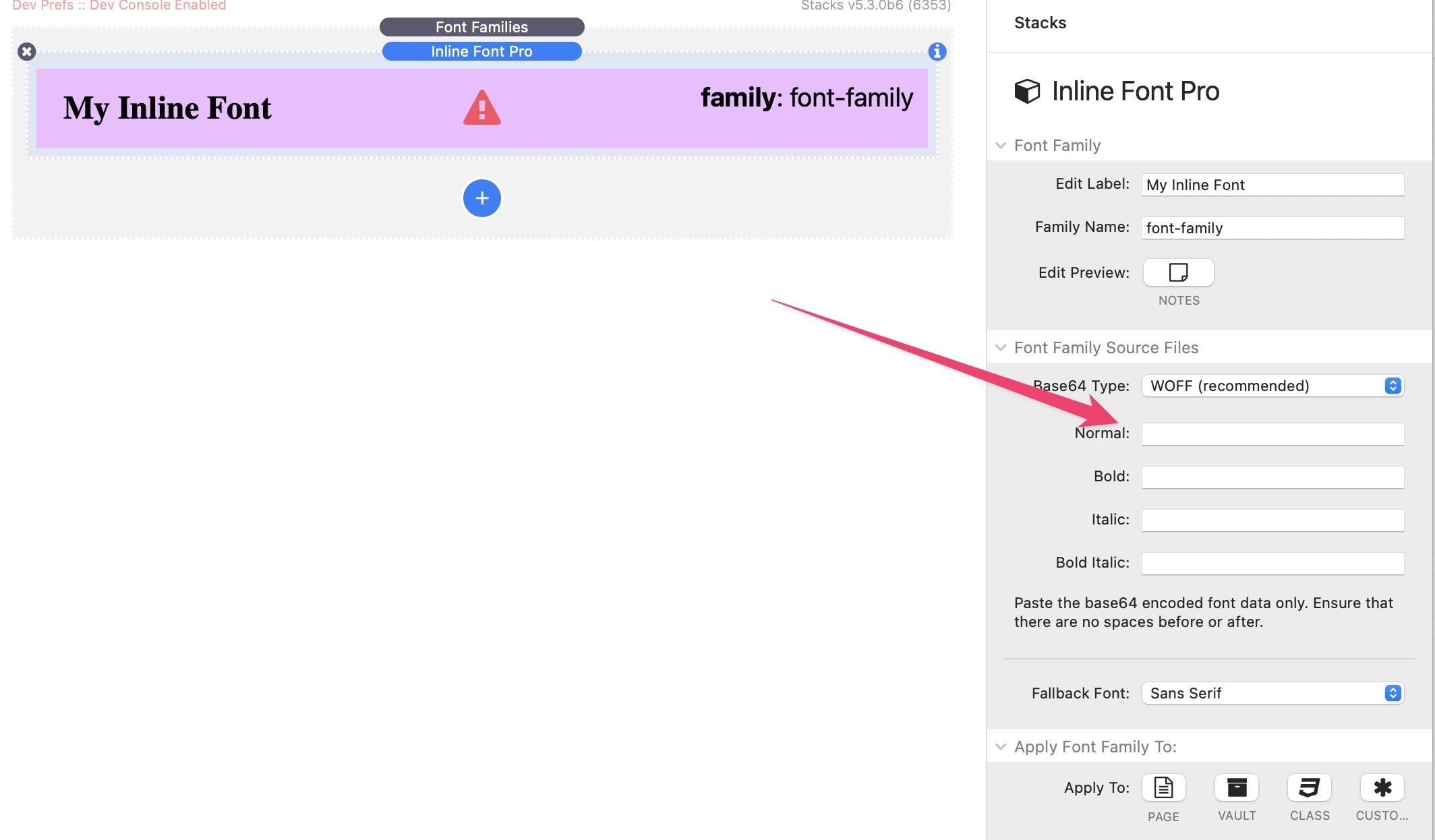
Using the Font Pro > Font Families stack add a new Inline Font
In the setting for the Normal typeface, paste in your newly generated Base-64 encoded font
Give the font a unique name in Font Pro or add it to a vault just like you normally would and use it knowing that it will load at the same time as the HTML
Step 4: Caution to others reading this :)
Don’t go encoding tons of huge fonts and inlining them all just because they will load quickly; your page html will balloon and you will defeat the object.
@tav Hi Andrew,
Thank you for the information. I followed all the steps but the drop cap still comes in too large until I refresh the page.
Here’s the page were I implemented it:
Thanks,
Richard
That page is not using the base64 inline font for the drop cap. It is still using the Stay Red font loaded as a WOFF from your server.
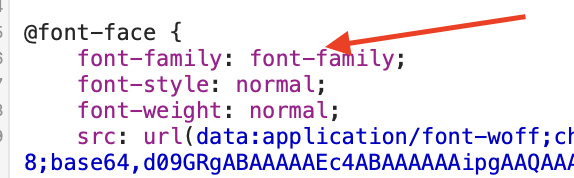
The inline font appears not to have been given a font family in the FontPro inline font settings as the font family is coded as “font-family” - this should be the new name that you define in the settings:
BUT
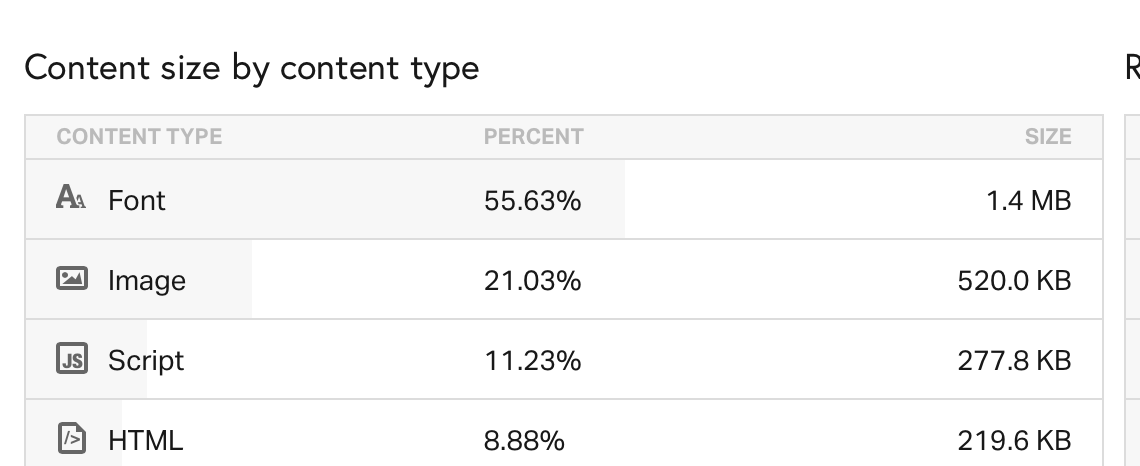
Your page is loading an enormous amount of fonts :
29 variants of Raleway
+
Advent Pro
+
Stay Red
Do you really need so many fonts?
They total 1.4MB and are over 1/2 of the total page size.
But back to the specifics of the drop cap issue. Per my second reply, did it work OK when using a system default font rather than the loaded Stay Red font? This was the initial test to see if it was the loading time that was causing the problem.
I, perhaps wrongly, assumed that it worked OK in this configuration which is why you asked about speeding up the loading of the stay red font?
Never the less, lets get the base-64 inline font sorted first.
Ensure that you have given it a family name in the inline font settings and optionally assigned it to a font vault. Then ensure that you have told the DropCap child to use that new font name / vault rather than the original Stay Red font (which remains the entire WOFF font on the server)
@tav
Thanks for all the time you are taking to reply - much appreciated.
I now keep getting the following when trying to create the A and S in Font Subsetter:
The file size for Stay Rad.ttf exceeds your allowed upload size limit. You can upgrade your account to get increased file size.
Do I need to create a paid account to use this properly?
But you have the base-64 code on your page already - it appears that all you need to do is to set up font pro and the drop cap stacks correctly with a unique font family name or vault for your base-64 encoded font.
I’ve just had another look and you do appear to have font-vault 6 in use for the drop cap but also the Stay Red font family as well (which I suspect is causing the problem) so again back to the 2nd post I made - did it work OK when you tested it using just default system fonts for the drop cap?
So, in addition to the system front test why not:
Create a blank project and just copy that Scribe stack with the Drop Cap onto a blank page
Add font pro and load the font (one test with the whole font and another with the base-64)
What happens?
Does it work or do you still see the problem?
@tav Yes it worked when I used default system fonts for the drop cap. I think it might be an idea if I forget trying to use the Stay Rad font as a drop cap.
Don’t give up yet.
First, just try moving the inline font to the top of the list in Font Pro - i.e. drag that child up in the order until it is the first child.
If that doesn’t change anything then send me a project file with just that broken page in it and I’ll take a look . I should be able to test it assuming your server allows cross origin font requests - see instructions here if you’re not sure how to do this : Instructions | Font Styles
@tav
Hi Andrew,
I have created a new project and things now seem to be working. I would appreciate it if you would take a look to confirm I’ve done it correctly.
https://dropcaps.adultballetsheffield.co.uk/caps-test/
Richard