The Stacks Beta just updated to version 66, and I managed to find some release notes on Joe’s site. What interested me most was Feature 1: Add an MCP plugin so users can use AI agents like Claude, Codex and GPT with Stacks. My first port of call, to discuss this with Chatty. Which was very excited, if a language model can be said to get excited. ‘So what can we do with this?’ ‘Lots! And I get to drive your computer…’ ‘No, wait!’ (actually that wasn’t quite its response, but it catches the gist of it).
I was excited by Dan’s announcement of AI integration with Elements a while back. But while I’ve forgotten now what the row with Realmac was all about, I’m not going to start over building a library of Elements. OTOH, my wife just built a site with ChatGPT, which blew me away (not least because she didn’t land me with months of frustration trying to make something with stacks). It is really good. And blisteringly fast. With some very clever functionality. It took me a while to work out what Chatty had even done: it’s a serverless web application built using Vinext and deployed using Cloudflare Workers. What? “Vinext is an open-source Vite plugin by Cloudflare that completely reimplements the Next.js API surface on top of the Vite build tool.” My brain aches just looking at that sentence, let alone trying to work out what it means. Somehow web development ran away from me while my attention was elsewhere.
But I don’t like the idea of putting my sites entirely in the hands of a language model either. Especially when I don’t even know where they are. (Everywhere and nowhere, apparently.)
So, actually, the idea of Stacks having agentic LLM integration (I do know what that means) is very good news. Almost worth waiting all this time for. What will it be able to do? I managed to retrieve the appropriate README.md file from the guts of the new Stacks.app and share its contents with ChatGPT. Which tells me it will likely be able to:
MCP capability
What the agent can presumably do
Open projects
Inspect projects currently open in Stacks
Source-list items
Inspect Pages, Partials, Layouts and Images
Page stack trees
See what stacks are actually placed on a page
Selections
Know what the user has selected
Placed-stack properties
Inspect the properties of a stack on the page
Add pages
Create a new page
Add installed stacks
Put a stack into the project
Select source-list items
Change what’s selected
Select placed stacks
Change what’s selected on a page
Set item properties
Modify Pages/Partials/Layouts/Images
Set stack properties
Modify properties of an actual placed stack
Sounds ideal to me. “Chatty, just make all the page margins wider, will you?” But, also, “Let me go in and tweak this stack that I’m not happy with”. Best of both worlds. Maybe.
I’ve had the chance to give it a try inside Claude Desktop, and I’m really impressed with what’s already possible in the first version!
With just a single sentence prompt, it can create a fully functional landing page. It even asked me which framework I had installed and took only a few minutes to build the stacks page.
If this is true, this will be the best web creator app ever created. I basically move completely from Rapidweaver to Antigravity with Claude Fable, and I can assure you that it is fast, usable, and editable. There are no limits. You ask and you get. Plus, you can customize the looks however you want, either manually or through prompts. I am a loyal Stacks user, and this post makes me so happy. I’m assuming you’ll use your own API, like LM Studio Bionic or OpenRouter. I won’t buy if a subscription is forced—obviously. If I can have the same experience plus Stacks, this will be insane! I don’t care how much Stacks Pro will cost. I will buy it out of the box. Seriously.
I‘ve now had a chance to experiment with the new Stacks beta in Codex. It took a moment to figure out how to set it up (the ChatGPT plugin must be installed, from the AI tab of the Stacks application’s Settings — it offers both ChatGPT and Claude) and it must be accessed from the Codex window of the ChatGPT desktop aplication (not the normal ChatGPT window). Choose ‘Plugins’ from the Codex sidebar, and ‘Personal’ from the ‘Installed’ section of the window that comes up, and you should see ‘YourHead’ with a Stacks button underneath it. Click it, and you’re away (you’re also going to have to give a lot of permissions in Codex — be alert for the requests). You also have to have Stacks beta running at the time, and a project (can be a new one) open.
What can I say? This is seriously impressive. It gives you complete control over all the settings on the stacks you have on the page. I tested it on my LockUp stack — because if it works on that, it will work on everything. I could control every setting from a chat window in Codex — change this, change that, it figured out what was required and did it. Well, that’s what it’s supposed to do. It just seems incredible that it actually does!
Game changer, Isaiah! Total game changer. Well done!
And I never thought I would say this, but Stacks.app beta 66 is now the smartest app on my desktop. It has catapulted from the steam-powered web-building age into the future. And it has given a new lease of life to my carefully hoarded collection of stacks.
Is anyone showing this off yet—YouTube videos, screen recordings, or anything along those lines? I’d love to see someone build a page and then tweak the stacks using AI.
To be honest, I haven’t done much web development over the past couple of years; I’ve been focused on other projects. But for 15 years, I earned a really nice living mainly from RapidWeaver, Stacks, and Total CMS 1, so this definitely has my attention.
Maybe it’s time to finally jump back into the game.
Yes, i did in the first 5 min of this being available
As I posted on weavers space
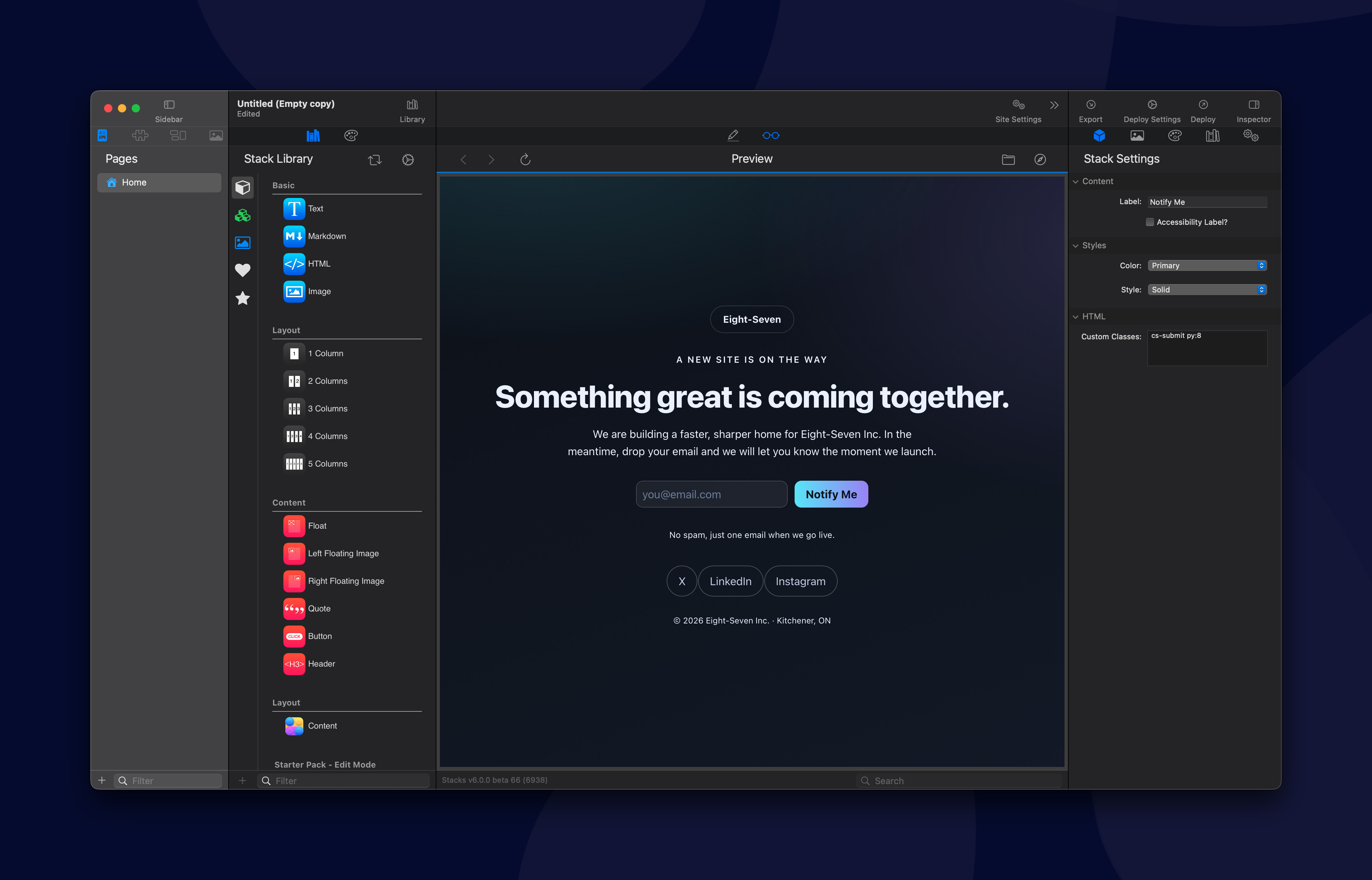
In this video I have Claude build a coming soon page for Eight-Seven, first as a plain HTML mockup so we can nail down the design fast.
Then at 1:25, I tell it to convert that HTML into actual Foundation 6 Stacks, using the new Stacks MCP connection. From there Claude drives the Stacks app directly: adding Columns Pro, Swatches, buttons, text, the whole layout, styled to match the mockup, no manual rebuilding required. Pretty wild seeing it go from static HTML to a real, editable Stacks project on its own.
And here is the final result (with 3 styling adjustments made manually after claude finished)
The really interesting question, now, is what can be done on the output end. My question to ChatGPT this morning was whether it was feasible to build a compiler that could take Stacks exports and convert them into a Next.js-style application on Vite, with Cloudflare Workers as the primary deployment target. (Yeah, I’m learning quickly — two weeks ago this would have been 100% gibberish to me! ). Its answer: “ Yes — feasible, and I don’t think it would be an absurdly large task for Codex if we define the translation target narrowly”. With some very interesting thoughts about what we could do on that latter point. But that’s us — it and I — doing this. I’m sure Isaiah and Joe and others have been thinking even more about these kinds of things for Stacks. And the thing that is so wild about all of this is that the kind of technical challenges that might have made a Microsoft or an Adobe balk a few years ago are no longer impediments even to individuals now (sure, we might make the lights in New Mexico dim for a few hours, and dry up the Rio Grande, but it’s doable on a $20/month subscription.)


 ). Its answer: “ Yes — feasible, and I don’t think it would be an absurdly large task for Codex if we define the translation target narrowly”. With some very interesting thoughts about what we could do on that latter point. But that’s us — it and I — doing this. I’m sure Isaiah and Joe and others have been thinking even more about these kinds of things for Stacks. And the thing that is so wild about all of this is that the kind of technical challenges that might have made a Microsoft or an Adobe balk a few years ago are no longer impediments even to individuals now (sure, we might make the lights in New Mexico dim for a few hours, and dry up the Rio Grande, but it’s doable on a $20/month subscription.)